

Initial Summary
Google Scholar is the default first stop for anyone trying to understand a researcher's output. Collaborators check it before reaching out. Journalists check it before quoting you. Grant committees check it while reviewing your application. Prospective PhD students check it before deciding whether to apply to your lab. Given this reality, a poorly configured or neglected Google Scholar profile is one of the most easily preventable visibility problems in academic life and one of the most common. This guide walks through every element of a Google Scholar profile that can be optimised, explains why each matters, and provides specific instructions for improving each one.
Why Google Scholar Profile Optimisation Matters
Before getting into the how, it is worth being clear about what a well-optimised Google Scholar profile actually does for you.
First, it improves your discoverability. Google Scholar profiles are indexed by Google's main search engine. A complete, well-maintained profile increases the likelihood that your name and research area appear prominently in general search results, not just academic searches.
Second, it ensures your citation metrics are accurate. Google Scholar automatically crawls academic publications and attempts to attribute them to author profiles. Without a verified and maintained profile, your metrics may be incomplete, inaccurate, or fragmented across multiple automatically generated profiles that don't represent the same person.
Third, it serves as a professional signal. A Google Scholar profile that is incomplete, has an outdated photo, or has not been logged into for years sends a different signal about your professional engagement than a complete, regularly maintained one.

Step 1: Claim and Verify Your Profile
If you have not already created a Google Scholar profile, the first step is to visit scholar.google.com and sign in with a Google account. You will need to use an email address at your academic institution for your profile to appear in public search results.
During the setup process, you will be prompted to search for publications that Google attributes to you. Review these carefully — Google's automated attribution is imperfect, especially for researchers with common names, researchers who have changed institutions, or researchers who publish across multiple sub-disciplines.
If you already have a profile, log in and check when you last reviewed it. If it has been more than six months, the steps below are worth working through systematically.
Step 2: Complete Your Profile Information
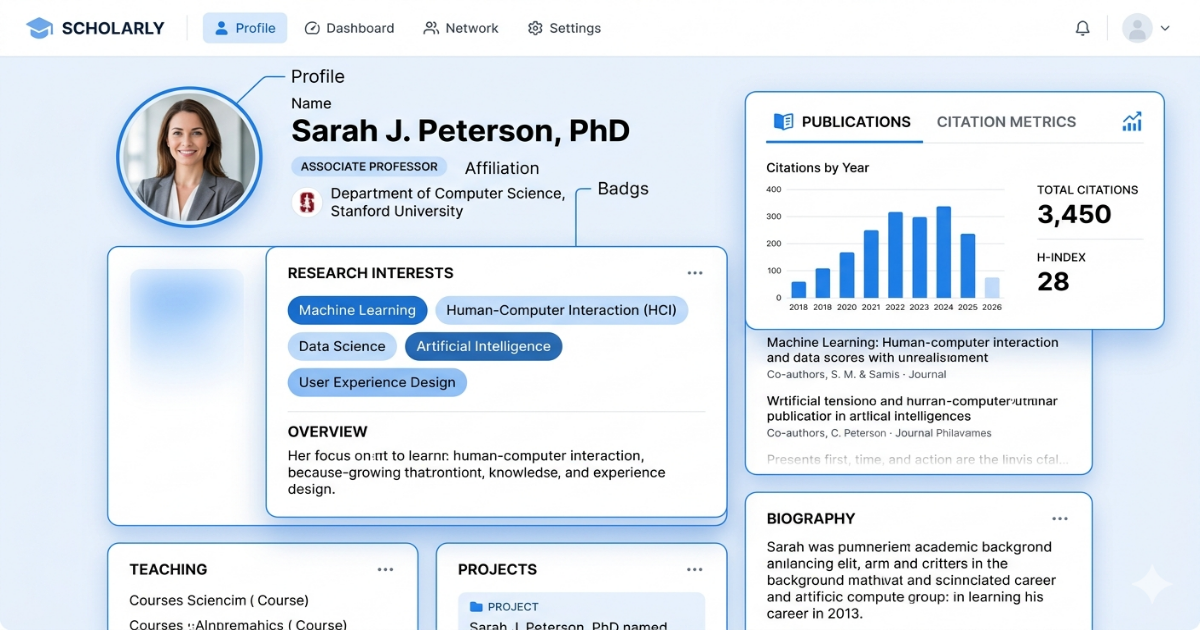
A complete Google Scholar profile includes the following.
Name: Use your name exactly as it appears on your publications. If you have published under variations of your name — with or without a middle initial, with or without hyphenation — note this, as the publications section will need careful review.
Affiliation: Your current institutional affiliation. Keep this current — an outdated affiliation is one of the most common and most easily avoidable profile errors.
Email for verification: This must be your institutional email address for the profile to be publicly listed.
Homepage: Link directly to your personal research website or institutional profile. This is a high-value field — it is the primary mechanism by which a Google Scholar profile visitor can find the full context of your academic presence.
Research interests: This field appears prominently on your profile and is used by Google Scholar to make your profile discoverable in searches for those topics. Include three to five specific, accurate research keywords — not broad disciplinary labels. "Epigenetics" is less useful than "chromatin remodelling" or "DNA methylation in cancer." Be specific enough to be discoverable by the right researchers.
Photo: Include a professional headshot. This is a small detail that has a measurable impact on whether a visiting researcher perceives the profile as actively maintained.
Key Insight: Google Scholar profiles with complete research interest keywords are significantly more likely to appear in Scholar search results for those specific terms than profiles with empty or generic keyword fields. The research interests field is not cosmetic. It is a primary discoverability mechanism. Researchers who leave this field empty or fill it with broad disciplinary labels are opting out of a significant visibility benefit at zero cost.
Step 3: Review and Clean Your Publications List
This is the most time-consuming part of Google Scholar optimisation, but it is also the highest-impact. Click on "My Profile" and scroll through your publications list carefully.
Add missing publications. Google Scholar does not capture every publication. Papers published in smaller journals, book chapters, conference proceedings, and recent preprints are particularly likely to be missing. Use the "Add articles" function to search for and add any publications that Google has not automatically attributed to your profile.
Remove or merge duplicate entries. Duplication is common the same paper may appear twice if it was indexed from multiple sources. Use the merge function to consolidate duplicates.
Fix misattributed papers. If Google has attributed papers to your profile that belong to a different researcher with a similar name, delete them. Misattributed papers corrupt your citation metrics and can create confusion about your actual research areas.
Check the publication details. Click through individual papers and verify that the year, journal, and co-author information is correct. Errors here affect your metrics and create a poor impression for visitors examining your publication record.
Step 4: Configure Your Citation Updates
Google Scholar can automatically add new publications to your profile as they are indexed. You can configure this in your profile settings under "Updates."
The default setting is to prompt you when new papers are found. Consider switching to automatic updates if your name is distinctive enough that false attributions are unlikely. If your name is common, manual review is safer.
Set up citation alerts for your published work if you have not done so. These email notifications tell you when a paper of yours has been cited — useful for monitoring the reception of your work and for identifying potential collaborators who are engaging with your research.
Step 5: Manage Your Public Profile Visibility
By default, Google Scholar profiles are only publicly visible if you have verified your institutional email address. Confirm that your profile is set to public. A private Google Scholar profile is, for practical purposes, no Google Scholar profile.
You can check this under Settings in your profile — look for the "Make my profile public" option.
Step 6: Connect Your Profile Across Platforms
A Google Scholar profile achieves its maximum value when it is integrated with the rest of your academic online presence. From your personal website, link to your Google Scholar profile from your publications page and from your homepage navigation or bio. From your ORCID profile, include the Google Scholar link in your bio or homepage field. From LinkedIn, add your Google Scholar URL to your contact information section. From institutional profiles, most university systems allow you to add external profile links make sure your Google Scholar URL appears on your university staff profile.
Key Insight: An analysis of researcher profiles across major academic platforms found that researchers who cross-link their Google Scholar, ORCID, ResearchGate, and personal website profiles receive significantly more profile views than researchers with equivalent publication records who maintain each platform in isolation. Platform integration is the highest-leverage, lowest-effort action a researcher can take to increase their online visibility.
Is Your Academic Brand Working For You or Against You?
If a collaborator, journalist, or funder Googled your name right now, what would they find? Would it clearly communicate your research identity, your credibility, and why your expertise matters? Or would they find an outdated institutional profile, a Google Scholar page that doesn't match your actual research areas, and a website that hasn't been touched since 2021? The gap between your actual expertise and what your online presence communicates is the gap your academic brand strategy needs to close.
→ Book a free academic brand audit
Frequently Asked Questions
How often should I update my Google Scholar profile?
At minimum, review your publications list quarterly to catch newly indexed papers and any errors that have appeared. Update your affiliation and research interests whenever they change. A profile that has not been touched in over a year sends a signal of inactivity regardless of your actual output.
Why are some of my papers not appearing on my profile?
Google Scholar indexes from a set of academic sources, and coverage is not universal. Papers from smaller journals, conference proceedings, book chapters, and preprint servers are more likely to be missed. Use the manual "Add articles" or "Add article manually" functions to include work that Google has not found automatically.
Should I include preprints on my Google Scholar profile?
Yes. Preprints are legitimate research outputs and their citation counts are tracked by Google Scholar. Including preprints on your profile gives a more complete picture of your current research activity and can drive citations before formal publication.
Can I dispute an h-index that seems lower than it should be?
You cannot dispute the h-index directly, but you can address its root causes — missing papers and misattributed papers both depress the metric. The most effective way to improve an underreported h-index is to ensure your publication list is complete and accurate.
What is the difference between Google Scholar, ORCID, and ResearchGate?
They serve different purposes. Google Scholar is primarily a search and citation tracking tool — the platform most likely to appear in general web searches and the most widely used by people outside academic publishing systems. ORCID is a persistent author identifier that disambiguates your work from other researchers with similar names and is increasingly required by journals and funding bodies. ResearchGate is a social networking platform for researchers with its own visibility and citation tracking features. All three are worth maintaining, but Google Scholar is the highest priority for general discoverability.
.gif)


