

Initial Summary
Starting a new faculty position is overwhelming. Between course preparation, grant applications, lab setup, and departmental onboarding, building a personal website often gets pushed to the bottom of the list. It shouldn't. A professor's website is typically the first thing prospective PhD students, postdoc candidates, collaborators, and journalists encounter when they search your name — and in the current academic job market, first impressions happen before any direct contact. This guide walks new professors through the strategic, structural, and practical steps of building a first academic website that works from day one and grows with your career.
Why Your First Website Is More Important Than Your Tenth
When you are established, your website is primarily a maintenance exercise — keeping publications current, adding new lab members, updating the news section. When you are new, your website does active work. It is the primary channel through which prospective PhD students find you, evaluate whether your research aligns with their interests, and decide whether to send a cold email.
Consider the recruiting funnel: a prospective PhD student sees a paper of yours at a conference or in a literature search. They search your name. They find your website. In the next 30–60 seconds, they decide whether to invest time in learning more about your lab or move on to the next name on their list. That decision is almost entirely based on what your website communicates — and what it fails to communicate.
The stakes are equally high for early-career grants. Programme officers and reviewers who encounter your name increasingly do a quick web search before reading your proposal. A professional, current, and intellectually coherent web presence reinforces the case your proposal is making. An absent or outdated site introduces doubt.
Step 1: Decide What Your Website Needs to Do
Before choosing a platform or writing a single word of content, clarify the primary jobs your website needs to perform. For most new professors, these are:
Recruiting PhD students and postdocs. This is usually the most time-sensitive function. New faculty need to build their team quickly, and a clear, welcoming recruitment message — with explicit information about funding availability, expected timeline, and how to apply — removes friction for strong candidates.
Establishing research credibility for collaborators and funders. Your website needs to communicate enough about your research direction, your publication track record, and your intellectual positioning that a senior researcher or programme officer can quickly assess whether you are a credible partner or applicant.
Providing a professional online presence for media and public engagement. As your research gains visibility, journalists and science communicators will search for you. A website with a short, quotable bio, a high-resolution headshot, and clear contact information makes it much easier for your work to receive coverage.
Key Insight: A 2022 Nature Careers survey found that 65% of PhD applicants reported that visiting a potential supervisor's personal website directly influenced their decision to apply. For early-career faculty actively building a lab, the website is the highest-leverage recruiting asset available and unlike grant applications or paper submissions, it is entirely within your control.
Step 2: Choose the Right Platform
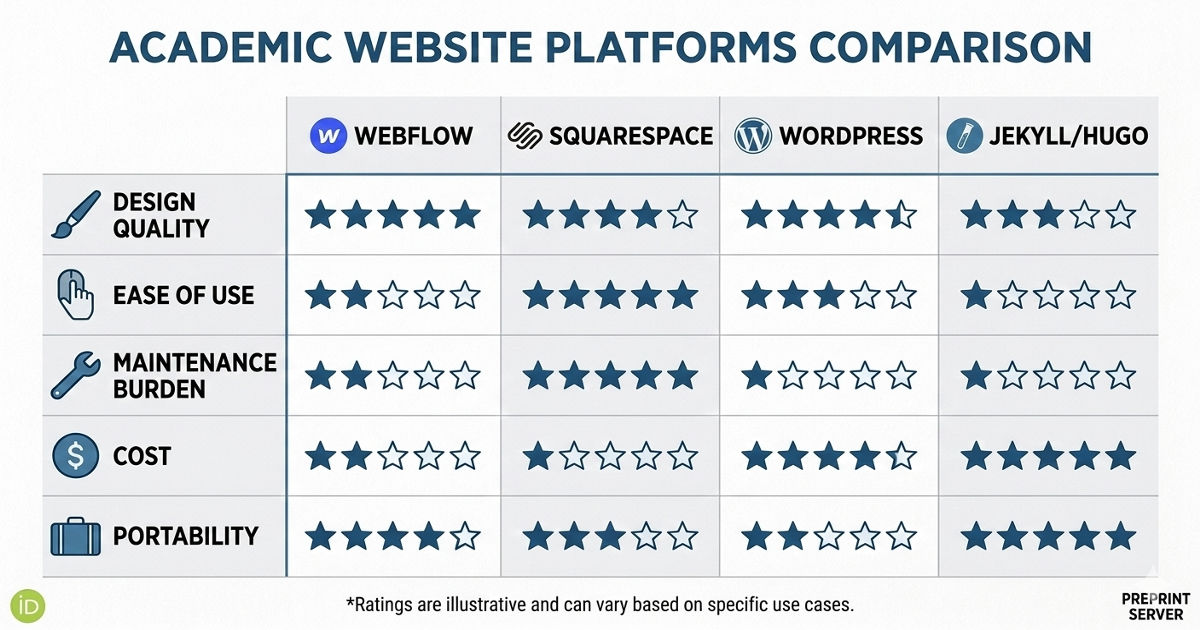
Platform choice for a first academic website comes down to three practical considerations: how much technical skill you have, how much time you can invest in maintenance, and whether you need to move the site if you change institutions.
Webflow is the best option for most new faculty who want a professional, visually strong result without long-term technical overhead. Sites built on Webflow load quickly, look clean on mobile, and require no plugin management. The learning curve is steeper than Squarespace but the design ceiling is higher.
Squarespace is the most practical choice for researchers who want something functional and presentable quickly with minimal investment. It produces clean, mobile-responsive sites and handles hosting and security automatically. The trade-off is limited design flexibility relative to Webflow.
WordPress (self-hosted) offers the most flexibility and the widest plugin ecosystem, but it requires ongoing maintenance — security updates, plugin compatibility, occasional breaking changes. For a researcher who does not have technical support, the maintenance burden can become a distraction. Managed WordPress hosting reduces but does not eliminate this overhead.
Academic-specific platforms such as academicpages (built on Jekyll) or Wowchemy (Hugo-based) are widely used in computer science, physics, and related fields. They are free, produce clean, fast sites, and integrate well with Google Scholar and GitHub. They require some comfort with Markdown and basic command-line tools.
Critical principle: Use a custom domain. Regardless of platform, register a personal domain (yourname.com or yourlabname.com) rather than relying on an institutional subdomain. When you move institutions and most early-career academics move at least once a custom domain means your website and all its accumulated Google search equity moves with you. Institutional subdomain sites are abandoned and rebuilt from scratch with every move.
Step 3: Structure Your Site — The Minimum Viable Academic Website
A first academic website does not need to be comprehensive. It needs to be correct and clear. The minimum viable structure consists of five pages:
Homepage: The most important page on your site. Within five seconds of arrival, a visitor must be able to answer: What does this researcher study? Is this lab active? Is it open to new students or collaborators? The homepage should have a brief, clear research statement (two to three sentences in plain language), a professional photo, and a visible recruitment signal if you are accepting students.
Research: A description of your current research programme, written clearly enough for a prospective PhD student from an adjacent field to understand it. Organise by theme rather than project, and include a short description of the broader significance of each theme. Avoid excessive jargon — the researcher who shares your precise specialisation already knows your work; this page is for everyone else.
Publications: A clean, organised list of your papers, ideally sorted by recency or theme. Include direct links to PDFs where copyright permits. For new faculty with a growing publication list, highlighting two or three papers with short lay summaries is more effective than a raw list of citations.
People / Lab Members: Even if your lab has only you and one PhD student, a People page signals that this is an active, growing research group. Include photos and short bios. Add a clear "Prospective Students" section with information about how to apply, what you look for in applicants, and what funding is available.
Contact / CV: A simple contact page with your institutional email address and a downloadable PDF of your current CV. Keep this updated — an out-of-date CV on a professor website is one of the most common oversights and one of the most damaging.
Unsure whether your research description is pitched at the right level?
read it aloud to a non-academic friend and see whether they can accurately describe your work afterwards. If they can't, revise before you launch.
→ We’ll help you make a website worth pitching
Step 4: Write Content That Actually Works
The single biggest mistake new professors make with their website content is writing for peer researchers. Your publications already speak to peer researchers. Your website needs to speak to a broader audience: prospective students, collaborators from adjacent fields, journalists, industry partners, and the occasional curious member of the public who encountered your work.
For your research description, use the "why it matters" test. Write your research description, then ask: why does this matter? Write that answer. Then ask again: why does that matter? Write that answer too. Usually after two or three iterations you arrive at a genuinely compelling framing that is accessible to a non-specialist without being condescending.
For your bio, write in the third person but with a human voice. "Prof. [Name] is an assistant professor in the Department of X at University Y, where she leads the Z Lab. Her research addresses [problem] by [approach], with applications in [domain]." This framing is concise, professional, and gives a journalist or collaborator everything they need to describe your work accurately.
For your recruitment message, be specific. "I am currently accepting applications for PhD positions starting in [month/year]. I am looking for students with backgrounds in [field] who are interested in [specific research areas]. Funding is available through [fellowship/grant]. Please read [specific paper] and email me with a brief description of your research interests." This specificity demonstrates that you take recruitment seriously and filters for genuinely interested, prepared applicants.

Key Insight: Analysis of highly-cited early-career researchers' online profiles consistently shows that those who maintain active, clearly written personal websites begin accumulating citations faster than peers who rely solely on journal platforms and institutional pages. The discoverability advantage of a well-structured personal website compounds significantly in the first five years after a researcher's first independent position
Step 5: Launch, Then Maintain
The biggest failure mode for a first academic website is not launching it — it is launching it and then not updating it. A website last updated six months after your start date sends a worse signal than no website at all: it suggests activity followed by abandonment.
Build a simple maintenance routine into your academic calendar:
- Immediately after each paper is accepted: Add it to your publications page, update your CV, and post a brief note in a news or updates section.
- Each semester: Update the People page with any new lab members, update the Prospective Students section if your availability changes, and check that all links are functioning.
- Once a year: Review and refresh your research description, update your photo if significantly outdated, and review your About/Bio page.
Build It Right From the Start
Your first academic website is an investment that compounds over your entire career. The search equity, the citation visibility, the reputation it builds with prospective students and collaborators. None of these materialise if the site is rushed, incomplete, or abandoned after launch.
→ Get a professional review of your new professor website before launch
Frequently Asked Questions
When should a new professor launch their website before or after starting the position?
Ideally before your start date, or within the first two weeks of starting. The period between accepting an offer and beginning the position is often the most time you will have for website work until the summer. A site live on your start date means that anyone who searches your name during the months of anticipation and announcement — prospective students, journalists, collaborators — finds something professional.
Should a new professor build a personal website or a lab website?
At the start of a career, these should be the same thing. A single site that serves as both your personal professional presence and your lab's home page is more maintainable than two separate sites, and more coherent to visitors. As the lab grows — typically after your first two or three PhD students — you may want to develop a dedicated lab site while maintaining a simpler personal page for invited talk bios, media enquiries, and so on.
How much should a new professor spend on a website?
A clean, functional website can be built for between SGD 0 and SGD 300 per year in platform and domain costs using DIY tools. If design quality matters to your recruitment or public engagement strategy, investing in professional web design typically SGD 2,000–6,000 for a quality academic website in Singapore is a one-time cost that pays dividends over a full academic career. The recurring annual cost (hosting, domain) is typically under SGD 200–400 regardless of approach.
Should my website include a list of courses I teach?
Yes, a brief teaching section is valuable. It serves two functions: it shows prospective students what working with you might look like intellectually, and it provides useful information for students at your institution who are considering enrolling in your courses. A teaching page doesn't need to be elaborate a list of courses with one-sentence descriptions is sufficient.
What is the biggest mistake new professors make on their first website?
Writing exclusively for peer researchers. Your publications page is for peers — they know how to read and evaluate papers. The rest of your website needs to be accessible to a prospective PhD student from an adjacent field, a journalist, an industry collaborator, or a grant programme officer who has twenty seconds to form an impression of your work. Write your research descriptions in plain language, use the "why it matters" framing, and save the technical detail for your papers.
.gif)


