

Initial Summary
A professor’s personal website is no longer optional, it is professional infrastructure. Students, collaborators, and media discover researchers individually, not institutionally.
To get a better understanding of the need I would like you to picture this scenario: A talented PhD candidate searches for experts in quantum cryptography. They find Dr. Martinez's name in several papers. Excited, they Google her. First result? A barely-updated university profile from 2019. No research website. No blog explaining her work. No clear way to learn about her lab culture or current projects.
Disappointed, the candidate keeps scrolling. Second result: Dr. Chen's personal academic website. Clean and elegant design. Clear research narrative. Recent blog posts. Student testimonials. Lab openings prominently featured. Video explaining her work.

Key Insight: Visibility determines mentorship before merit is evaluated.
Guess who gets the email?
In 2026, the question isn't whether professors need personal websites, it's whether you can afford not to have one. Let's explore why professor personal websites have become essential career infrastructure and what makes them truly effective.
The Brutal Truth About University Faculty Pages
Let's be honest: most institutional faculty pages are terrible. They're not designed for you, they're designed to fit the university's administrative structure. Your groundbreaking research gets reduced to a paragraph. Your teaching philosophy? Nowhere to be found. Your personality? Completely erased.
The problems with relying solely on university profiles:
- Zero control: Want to update your bio? Submit a request to IT. Want to add a blog? Not permitted. Want to customize the design? Absolutely not.
- Buried deep: Your profile is typically three or four clicks from the homepage, nested under Department → Faculty → Your Name. Most visitors give up before finding you.
- Outdated information: That bio still lists your 2018 research interests? The IT department will get to your update request... eventually.
- Not portable: Change universities? Your entire online presence gets deleted. Those carefully built search rankings? Gone.
- Generic template: Every faculty page looks identical. There's no way to showcase your unique research approach or teaching style.
What Personal Academic Websites Actually Accomplish
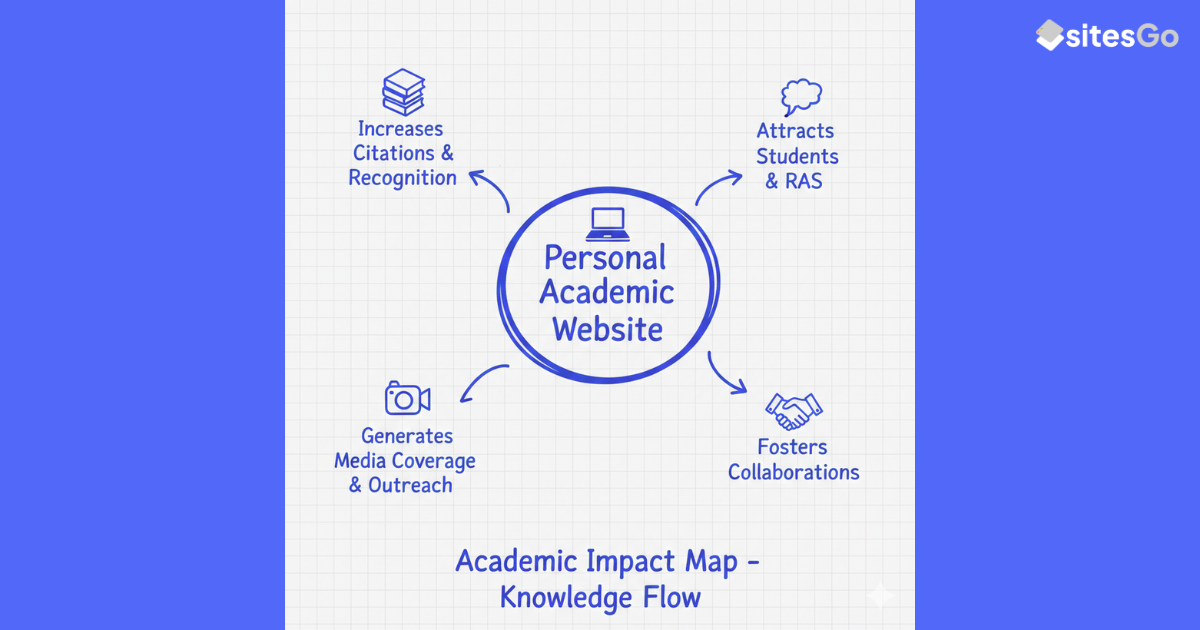
A well-crafted professor website isn't vanity, it's strategic infrastructure that serves multiple critical functions simultaneously.
1. Attract Better PhD Candidates
Prospective PhD students don't just apply to universities, they apply to work with specific professors. When they search for experts in their area of interest, personal academic websites consistently outrank institutional pages. Your site is often their first real introduction to you as a potential mentor.
A compelling personal site tells students exactly what it's like to work with you: your research philosophy, lab culture, mentoring style, and current projects. This transparency attracts candidates who genuinely fit your approach while filtering out poor matches.
2. Amplify Research Impact
Your research deserves a bigger audience than journal subscribers. A personal website lets you:
- Explain your research in accessible language alongside technical papers
- Share preliminary findings and working papers
- Provide data visualizations and interactive demos
- Connect your publications into a coherent research narrative
The result? Higher citation rates. When your work is easier to find and understand, more researchers cite it.
3. Enhance Teaching Effectiveness
Students increasingly research professors before enrolling in courses. A professor personal website that shares syllabi, course philosophies, and student resources:
- Helps students make informed course selections
- Demonstrates your commitment to teaching excellence
- Provides a centralized resource hub they can access anytime
- Closes the distance between you and students before the semester even starts
4. Build Professional Opportunities
Conference invitations, collaboration requests, consulting opportunities, media interviews, book contracts, they all start with discovery. When journalists need an expert quote, they Google the topic. When conference organizers search for keynote speakers, they look for clear online expertise signals.
A strong personal website makes you findable and credible, positioning you as the go-to expert in your field.
5. Control Your Digital Narrative
Google your name right now. What appears? If you haven't built a personal site, the top results might be: an outdated university bio, random conference proceedings, someone else with your name, or worse nothing at all.
What Makes a Professor Website Actually Work
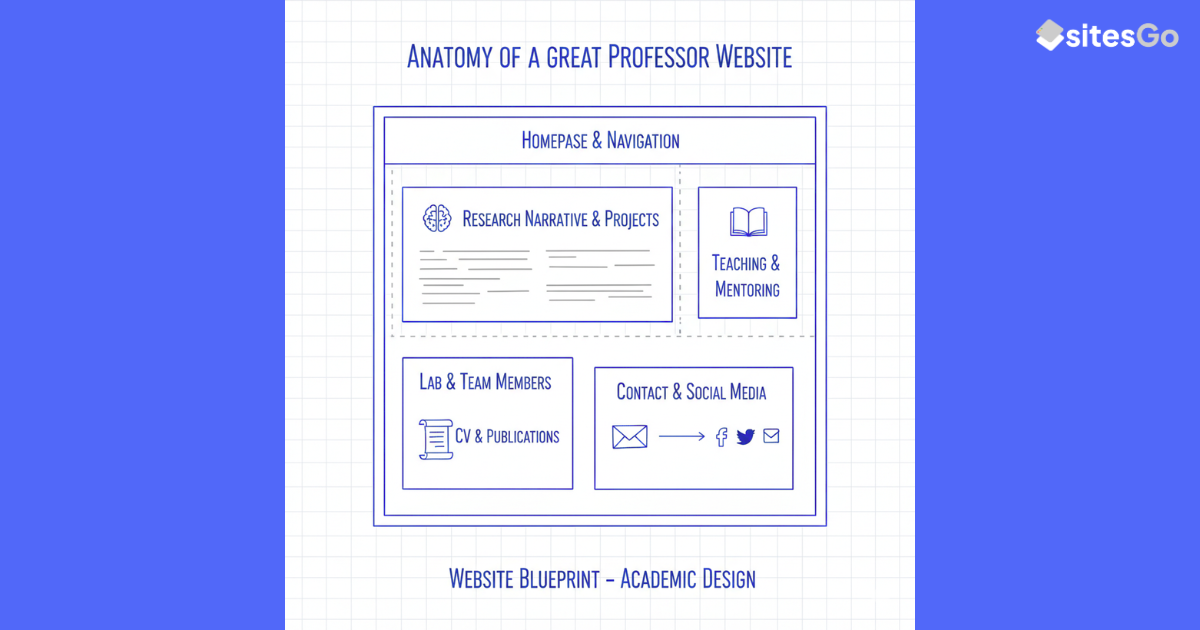
Having a website isn't enough. Looking at the best professor website examples, several patterns consistently emerge:
1. Homepage with Immediate Clarity
Visitors should instantly understand who you are and what you do. Skip the academic jargon in the opening sentence. Instead: 'I study how machine learning can predict protein folding' beats 'My research interests include computational approaches to structural biology.'
2. Research Page with Narrative
Don't just list publications chronologically. Organize themes and projects. Explain why each line of research matters. Use plain language summaries alongside technical papers.
3. Teaching Philosophy and Resources
Share course syllabi, reading lists, and lecture notes. Explain your teaching approach. This transparency builds trust with current and prospective students.
4. Lab/Group Information (if applicable)
Clearly state whether you're recruiting. Describe your lab culture, mentoring philosophy, and what you look for in students. Include current team members with photos when possible.
5. Professional CV
Make it downloadable in PDF format. Keep it updated. This is what people reference when writing recommendation letters, nominating you for awards, or inviting you to speak.
6. Contact Information
Make it ridiculously easy to reach you. Email address, office hours, maybe a contact form. If you're not comfortable sharing your university email, create a professional Gmail.
Advanced Features That Separate Good from Great
Blog or News Section
Regular updates signal active expertise. Even quarterly posts about recent papers, conference insights, or teaching reflections boost your SEO and demonstrate ongoing engagement with your field. Plus, fresh content is the single most powerful SEO signal.
Media Gallery
Short videos explaining your research, conference presentation slides, research posters, and data visualizations make your work accessible. Video content especially resonates with prospective students who want to see your communication style.
Student/Alumni Testimonials
Nothing builds credibility like former students explaining what they learned working with you. Brief quotes or short video testimonials provide powerful social proof.
Interactive Elements
For some fields, interactive demos or data visualizations can make complex research tangible. Computational researchers might share code repositories. Social scientists could provide interactive data dashboards.
Design Principles That Actually Matter
You don't need to be a designer. But you do need to understand basic principles that make professor website design effective:
Mobile-First Always
Over 60% of traffic comes from mobile devices. Test your site on your phone. If navigation is clunky or text is tiny, you're losing visitors.
Professional But Not Sterile
Your site should convey expertise while retaining warmth. Use a professional headshot, not a selfie. Choose clean fonts like Arial or Georgia. Include personal touches, hobbies, hometown, what drew you to your field.
Speed Matters
Slow sites frustrate visitors and hurt SEO. Compress images. Use modern hosting. Minimize plugins. Aim for under 3-second load times.
Accessibility Is Non-Negotiable
Use sufficient color contrast. Add alt text to images. Ensure keyboard navigation works. Accessibility helps everyone and improves SEO.
Platform Choices: What Works in 2026
The 'best' platform depends on your technical comfort and needs:
For Non-Technical Users
- Wix: Excellent templates specifically for academics. Drag-and-drop simplicity. Great mobile optimization.
- Squarespace: Beautiful design templates. Intuitive interface. Built-in SEO tools.
- SITE123: Specifically designed academic templates. Very beginner-friendly.
For Users Comfortable with Code
- Webflow/WordPress: Maximum flexibility. Thousands of themes and plugins. Can be hosted anywhere.
- Jekyll/Hugo: Static site generators. Extremely fast. Free hosting on GitHub Pages.
- HTML/CSS from scratch: Complete control. Requires significant technical knowledge.
Free vs. Paid: The Real Trade-Off
Free options (WordPress.com, Wix free tier) come with limitations: branded URLs (yourname.wix.com), ads, limited customization. For professional academics, spending $10-20/month for your own domain (yourname.com) and basic hosting is worthwhile. Your domain is your permanent digital address that moves with you between institutions.
Common Objections (And Why They're Wrong)
'I don't have time.'
Initial setup takes 4-6 hours with a template. Maintenance? 30 minutes quarterly to update publications and news. That's less time than one committee meeting per year. And the ROI: better students, more collaboration, higher research impact, far exceeding the time investment.
'My university provides a faculty page.'
Yes, and it's insufficient. Keep it updated for institutional purposes, but supplement it with a personal site you control. The best approach is both/and, not either/or.
'I'm not tech-savvy.'
Modern website builders are designed for non-technical users. If you can use Microsoft Word, you can build a Wix or Squarespace site. Many universities also offer website building support through their IT or library services.
'Nobody will visit it.'
Wrong. Google Search Console data shows that even moderately-optimized academic websites receive hundreds of visits monthly. Those are prospective students, potential collaborators, and people discovering your research. Without the site, you'd never connect with them.
'It feels self-promotional.'
Reframe it: you're making your work accessible. Scholarship has always required dissemination. A personal website is simply the modern version of giving public lectures or publishing in accessible journals.

Key Insight: A personal website is academic infrastructure, not self-promotion.
SEO for Professors: The Basics
Basic SEO ensures people can actually find your site. You don't need to be an expert just implement these fundamentals:
- Use your name in the page title: 'Dr. Sarah Chen | Climate Science Researcher | MIT'
- Include your research keywords naturally: Don't stuff keywords, but mention your specializations multiple times.
- Link from your institutional profile: Universities have high domain authority. A link from your faculty page dramatically boosts your personal site.
- Maintain Google Scholar and ORCID: These profiles rank highly and should link to your website.
- Update regularly: Fresh content signals active expertise to search engines.
Real Examples: Learning from the Best
Looking at award-winning personal academic websites from the 2025 Best Personal Academic Websites Contest reveals common success patterns:
- Clear research narratives: Winners organize projects thematically with visual aids explaining complex research in accessible terms.
- Personality shines through: Best sites balance professionalism with warmth photos, personal interests, and approachable writing tone.
- Multiple content types: Successful professors include blogs, videos, infographics, and downloadable resources.
- Strong visual design: Clean layouts, cohesive color schemes, and professional photography create memorable impressions
Your Action Plan: Getting Started This Week
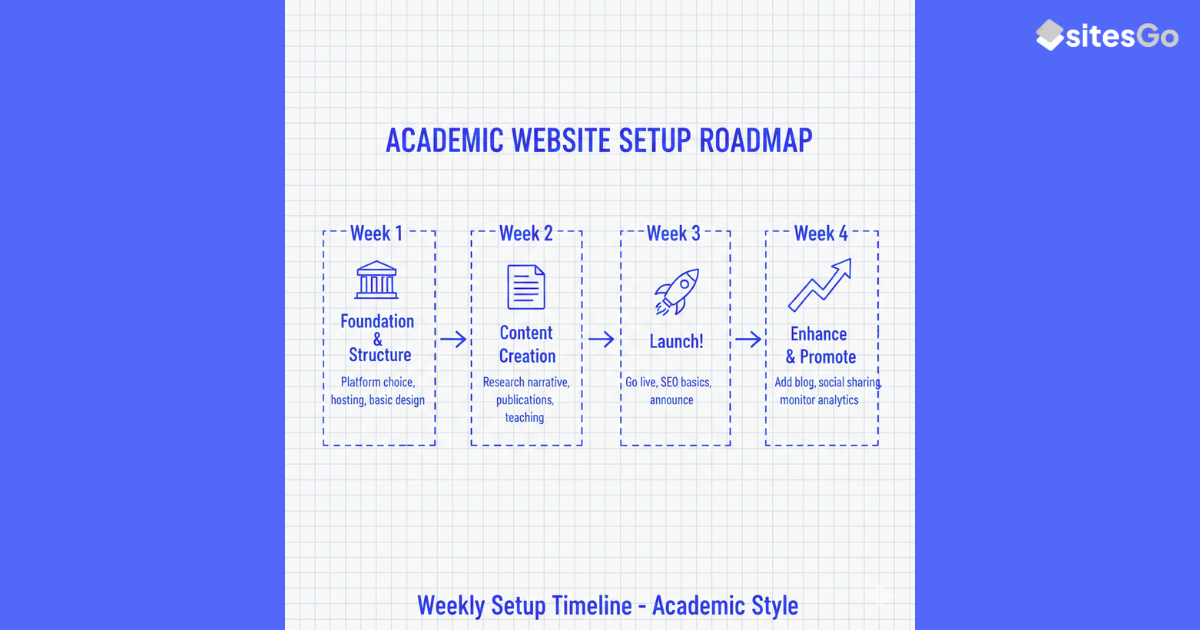
Building your personal website doesn't require a months-long project. Here's a realistic weekly plan:
Week 1: Foundation (2-3 hours)
- Choose a platform (Wix, Squarespace, or WordPress)
- Register a domain (yourname.com)
- Select a template that matches your field
- Add your name, position, and contact info
Week 2: Core Content (3-4 hours)
- Write a clear homepage introduction (200 words)
- Create a research page with current projects
- Upload your CV
- Add recent publications with brief summaries
Week 3: Polish and Launch (2-3 hours)
- Add professional headshot
- Test mobile responsiveness
- Set up basic SEO (page titles, meta descriptions)
- Link from your university profile and Google Scholar
- Announce launch on social media
Week 4: Enhancement (1-2 hours)
- Add teaching page with syllabi
- Write first blog post explaining recent research
- Submit site to Google Search Console
Already thinking you should probably have a site… but not sure what it should include?
We can outline a simple structure tailored to your research area. No commitment, just clarity.
→ See what my academic site should contain
The Bottom Line
Do professors really need personal websites? In 2026, the question feels almost quaint. The real question is: can you afford to be invisible?
Consider the costs of not having a site:
- Talented students who find your competitors instead
- Research that reaches a fraction of its potential audience
- Missed collaboration and speaking opportunities
- Zero control over your professional online presence
Now compare that to 8-10 hours of initial work and quarterly 30-minute updates. The ROI is overwhelming.
Your research deserves an audience. Your students deserve to know who you really are. Your field deserves your accessible expertise. And you deserve professional opportunities that match your capabilities.
A professor's personal website isn't vanity, it's professional infrastructure for the digital age. The question isn't whether to build one. The question is: what are you waiting for?
Final Conclusion
In 2026, not having a personal website doesn’t make you humble, it makes you undiscoverable.
Actionable Next Steps
Week 1 domain + template
Week 2 research + CV
Week 3 publish + link profiles
Week 4 first explanation article
Turn your research presence into opportunities
SitesGo builds professor websites designed to attract students, collaborators, and citations, not just exist online.
Frequently Asked Questions
How much does it cost to build and maintain a professor website?
Initial costs range from free (using platforms like WordPress.com or Wix free tier) to $200-500 for a professionally designed site. Annual maintenance costs $10-20 monthly for domain registration and basic hosting, or $15-35 monthly for premium platforms with better features. Time investment is 8-10 hours for initial setup and 30 minutes quarterly for updates. This makes a personal academic website one of the highest-ROI professional investments you can make far less than conference travel, yet potentially delivering better career returns through student recruitment, collaboration opportunities, and research visibility.
What if my university doesn't allow personal academic websites?
This is extremely rare. Most universities encourage faculty web presence as it enhances institutional reputation. If policy questions arise, frame your personal site as complementary to (not competitive with) your university profile. Personal sites extend your reach, provide detail your institutional page can't accommodate, and travel with you across career moves. If genuine policy barriers exist, consider hosting academic content on platforms like Google Scholar, ResearchGate, or LinkedIn, though these offer less control than your own domain. In most cases, checking with your department chair will confirm that personal academic sites are not only permitted but encouraged.
Should I include personal information on my professor website?
Include selective personal touches that humanize you without compromising privacy. Mentioning hobbies, hometown, or what drew you to your field makes you relatable and memorable. Avoid oversharing private details like home address, family photos, or political views unless directly relevant to your academic work. The sweet spot is professional authenticity. Students want to know you're a real person with interests beyond research, but they're primarily seeking academic expertise and mentorship. A brief 'About Me' section with 2-3 personal details alongside your professional credentials strikes the right balance.
How often should I update my professor website?
Update your CV and publications list immediately when new work is published or positions change. Review and refresh your entire site quarterly updating course offerings, research progress, and availability for new students. Add new content (blog posts, research updates, teaching reflections) monthly if possible, though even quarterly updates signal active expertise. The key is consistency over frequency; irregular bursts followed by year-long silences hurt more than steady quarterly maintenance. Set calendar reminders for the start of each semester to review and update. Fresh content is the single strongest SEO signal and demonstrates ongoing engagement with your field.
What should I do if I'm changing universities?
This is precisely why owning your domain matters. With your own website (yourname.com), you simply update your affiliation and contact information your URL, content, and search rankings remain intact. Your digital presence travels with you, unlike institutional pages that disappear when you leave. Update your new university profile to link to your personal site, maintaining the connection between institutional credibility and personal brand. If you've been relying solely on your university page, changing institutions means starting visibility from scratch. A personal site is professional insurance against career transitions.
Can a personal website help with tenure and promotion?
Absolutely. A well-maintained website demonstrates research productivity, teaching excellence, and service contributions all tenure criteria. It provides easily accessible evidence of your scholarly impact through publication summaries, citation metrics, and media coverage. Teaching portfolios with student testimonials and course materials showcase pedagogical innovation. Service activities become visible through conference organization, editorial board membership, and public engagement. During tenure review, committees can efficiently evaluate your full body of work. External reviewers gain comprehensive understanding of your contributions. A professional website doesn't replace traditional tenure materials, but it presents them in a compelling, accessible format that strengthens your case.
.gif)


