

Initial Summary
Breadcrumb navigation is one of the most consistently overlooked elements on academic websites and one of the most consequential for both user experience and search engine performance. When a prospective PhD student lands on a deep page about a specific research project, or a journalist navigates to a faculty profile from a department listing, the breadcrumb trail is what tells them where they are, how the site is organised, and how to move laterally without hitting the back button repeatedly. Done well, breadcrumbs reduce bounce rates, improve crawl efficiency for search engines, and contribute meaningful structured data to how Google represents your pages in search results. Done poorly — or absent entirely — they leave visitors stranded on pages with no contextual anchor and no intuitive path forward. This guide covers what breadcrumbs are, why they matter specifically for academic websites, how to implement them correctly across the most common academic CMS environments, and how to diagnose and fix the most frequent implementation errors that undermine their value.
What Are Breadcrumbs and Why Do They Matter for Academic Sites?
Breadcrumbs are a secondary navigation element, typically displayed horizontally near the top of a page, that show the user's current location within a website's hierarchy. A standard breadcrumb trail on a university research lab site might read:
Home > Research Labs > Computational Biology Lab > Publications > 2024
This seemingly simple element does several distinct jobs simultaneously.
For users, breadcrumbs provide spatial orientation they answer the question "where am I on this site?" without requiring the visitor to think consciously about site structure. For academic websites, which often have deep hierarchies spanning departments, research groups, individual faculty, projects, and publication archives, this orientation is genuinely valuable. A visitor who arrives on a specific paper abstract page from a Google search has no inherent sense of how that page fits within the broader site; the breadcrumb gives them that context instantly and invites lateral exploration.
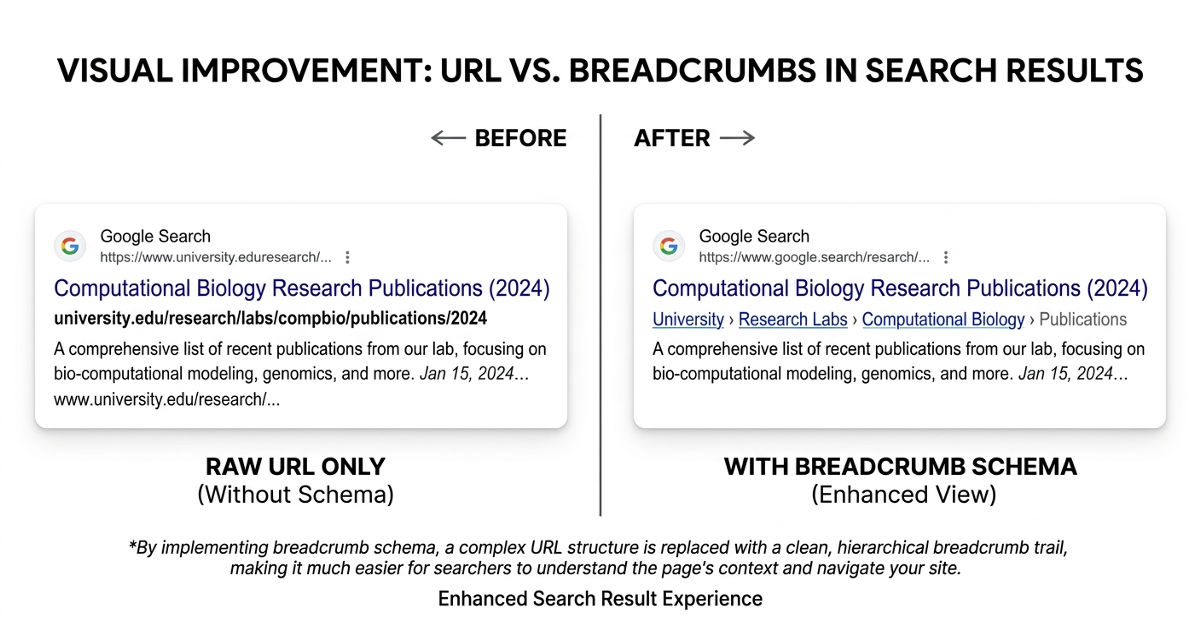
For search engines, breadcrumbs signal hierarchical structure. When implemented with proper schema markup (covered in detail below), breadcrumbs communicate the semantic relationships between pages to Google's crawlers in machine-readable form. This improves how Google understands your site architecture, can improve crawl efficiency on large sites, and enables the breadcrumb display format in search result snippets, a visual enhancement that has been shown to improve click-through rates.
For internal linking, breadcrumbs create systematic cross-page link relationships that distribute page authority through the site's hierarchy. Each breadcrumb link from a deep page back to its parent and grandparent pages is an internal link with anchor text, contributing to the link equity that determines how well those parent pages rank.
Key Insight: Breadcrumbs are not a design feature, they are a structural signal. Their primary value is not visual tidiness but the communication of site hierarchy to both users and search engines. An academic website with 200+ pages and no breadcrumb system is structurally opaque: visitors can't navigate it intuitively, and Google can't efficiently map its relationships. The implementation cost is low; the structural benefit compounds with every page you add.
The Three Types of Breadcrumbs Academic Websites Use
Hierarchy-based breadcrumbs are the most common and the most useful for academic sites. They reflect the structural relationship between pages — where the current page sits in the parent-child hierarchy of the site. This is the correct default for most academic websites.
Attribute-based breadcrumbs are used on pages that can be reached through multiple taxonomic paths — for example, a paper that belongs to both a research area and a publication year. These are more complex to implement and are typically relevant only for large research portals with sophisticated filtering systems.
History-based breadcrumbs reflect the path a specific user took to reach the current page (essentially a browser-history-based trail). These are almost never appropriate for academic websites — they are dynamic, non-indexable, and provide no structural benefit.
For the vast majority of academic websites — professor sites, research lab sites, university department pages — hierarchy-based breadcrumbs are the correct choice and the only type covered in this guide.

When Breadcrumbs Are and Are Not Necessary
Breadcrumbs are most valuable on websites with three or more levels of hierarchy. A simple one-page professor profile site has no meaningful hierarchy to represent. A research lab site with a homepage, section pages (Research, Team, Publications, News), and multiple child pages under each section is exactly the context where breadcrumbs pay off.
Academic sites where breadcrumbs are strongly recommended:
- Research lab websites with project subpages and publication archives
- University department websites with faculty listings, course pages, and research group subpages
- Academic conference websites with programme, speakers, and paper submission subpages
- Multi-researcher group sites with individual profile pages nested under a team structure
Academic sites where breadcrumbs add minimal value:
- Single-page professor profiles
- Simple three-page sites (Home, Research, Contact) with no further nesting
- Portfolio sites where all content is on a single scrollable page
How to Implement Breadcrumbs: Platform-Specific Guidance
WordPress
WordPress is used by a significant proportion of academic personal and lab websites, particularly those built without institutional CMS constraints. The most straightforward implementation uses a plugin.
Recommended approach: Yoast SEO (free tier)
Yoast SEO includes a breadcrumb system that automatically generates hierarchy-based breadcrumbs based on your WordPress post/page structure. To enable it:
- Install and activate Yoast SEO
- Navigate to Yoast SEO > Search Appearance > Breadcrumbs
- Enable breadcrumbs
- Copy the breadcrumb display code Yoast provides and add it to your theme's template files — typically header.php or single.php and page.php
The code Yoast provides will also automatically include the correct schema markup (see below).
Manual implementation (for theme developers)
If you're building or modifying a WordPress theme directly, breadcrumbs can be implemented using the get_the_ID() and get_post_ancestors() functions to traverse the page hierarchy programmatically.
Webflow
Webflow does not have native breadcrumb functionality but supports breadcrumbs through CMS collections and custom HTML embeds.
Recommended approach: Custom HTML/CSS with CMS field references
For a research lab site built in Webflow with a standard hierarchical structure:
- Create a text field in your CMS collections for "parent section name" and "parent section URL"
- In your page template, add a Rich Text or HTML embed element with the breadcrumb structure, referencing those CMS fields
- Style the breadcrumb container using Webflow's visual editor
For schema markup in Webflow, add a custom code embed in the page settings with the JSON-LD structured data block described below.
Squarespace
Squarespace has limited native breadcrumb support, though some Business and Commerce plan templates include basic breadcrumb functionality. For academic sites on Squarespace:
- Check whether your template includes built-in breadcrumbs (inspect the page source for breadcrumb or BreadcrumbList schema)
- If not, breadcrumbs can be added via the Code Injection feature (Settings > Advanced > Code Injection) using a JavaScript snippet that reads the page URL structure and builds a breadcrumb trail dynamically
This approach is functional but not as structurally reliable as a CMS-native implementation, as it depends on URL patterns rather than explicit hierarchy definitions.
Static HTML Sites
For academics maintaining simple static sites, breadcrumbs are implemented directly in the HTML of each page. The full implementation including schema markup looks like this:
- <nav aria-label="breadcrumb">
- <ol class="breadcrumb">
- <li><a href="/">Home</a></li>
- <li><a href="/research/">Research</a></li>
- <li aria-current="page">Computational Methods</li>
- </ol>
- </nav>
Schema Markup for Breadcrumbs: The Critical Step Most Sites Miss
Implementing visible breadcrumb navigation without the corresponding schema markup is a missed opportunity. Schema markup — specifically the BreadcrumbList type from Schema.org — communicates your breadcrumb structure to search engines in machine-readable form, enabling rich result display in Google Search.
The correct implementation uses JSON-LD (Google's preferred format) placed in the <head> section of each page:
- {
- "@context": "https://schema.org",
- "@type": "BreadcrumbList",
- "itemListElement": [
- {
- "@type": "ListItem",
- "position": 1,
- "name": "Home",
- "item": "https://yoursite.com/"
- },
- {
- "@type": "ListItem",
- "position": 2,
- "name": "Research",
- "item": "https://yoursite.com/research/"
- },
- {
- "@type": "ListItem",
- "position": 3,
- "name": "Computational Methods"
- }
- ]
- }
Note that the final item in the list (the current page) does not require an "item" URL property according to Google's implementation guidelines, though including it does no harm.
Validation: After implementation, use Google's Rich Results Test (search.google.com/test/rich-results) to verify that your breadcrumb schema is being read correctly. The tool will show you exactly what Google sees and flag any errors.
Not sure whether your academic website’s structure is set up to support breadcrumbs?
We build academic websites with proper hierarchy, schema markup and navigation baked in from day one.
→ See how we structure academic websites
Key Insight: Breadcrumb schema markup is one of the few structured data implementations where the effort-to-reward ratio is unambiguously positive for academic websites. Google's documentation confirms that the correct BreadcrumbList schema enables breadcrumb display in search result snippets replacing the raw URL with a readable path trail. For academic sites where URLs are often long and opaque (.edu/faculty/research/projects/2023/computational-biology), the breadcrumb display in search results meaningfully improves the click-through signal for prospective students, collaborators, and journalists scanning results pages.
Common Breadcrumb Problems and How to Fix Them
Problem 1: Breadcrumbs Not Reflecting Actual Site Structure
Symptom: The breadcrumb shows a path that doesn't match how users actually navigate to the page, or the hierarchy implied by the breadcrumb doesn't match the site's menu structure.
Cause: Often occurs when pages are categorised differently in the CMS than they appear in the visual navigation. In WordPress, for example, a page might be a child of one parent in the page hierarchy but linked from a different section in the menu.
Fix: Audit your CMS page hierarchy to ensure parent-child relationships are explicitly defined and consistent with your navigation structure. In WordPress, this means checking the "Parent" field for each page in the Page Attributes section of the editor. Your breadcrumbs should reflect CMS hierarchy, not menu placement.
Problem 2: Missing Breadcrumbs on Blog/News Post Templates
Symptom: Breadcrumbs appear correctly on static pages but are absent from news updates, blog posts, or project update posts.
Cause: Theme templates for posts and static pages are often separate files. Breadcrumb code added to page. php won't automatically appear on templates governed by single. php or custom post type templates.
Fix: Ensure breadcrumb code is added to all relevant template files, or use a conditional function that checks the page type and inserts breadcrumbs accordingly. Most breadcrumb plugins handle this automatically.
Problem 3: Schema Markup Present But Not Validated
Symptom: You've added breadcrumb schema but Google Search Console shows errors, or the Rich Results Test returns warnings.
Common causes:
- Mismatched URLs (schema uses a different URL format than canonical URLs — e.g., http vs https, trailing slash inconsistency)
- Incorrect @type value
- Missing required position property
- The schema is present in the HTML source but rendered client-side via JavaScript after initial page load (Googlebot may not execute all JavaScript when crawling)
Fix: Run all breadcrumb pages through Google's Rich Results Test. For JavaScript-rendered schema, move the JSON-LD to be output in the server-side HTML rather than injected via client-side scripts.
Problem 4: Breadcrumbs Truncate or Display Incorrectly on Mobile
Symptom: On mobile screens, the full breadcrumb trail overflows its container, wraps awkwardly, or extends beyond the viewport width.
Fix: Implement CSS truncation for long breadcrumb trails on small screens:
- .breadcrumb {
- display: flex;
- flex-wrap: wrap;
- overflow: hidden;
- white-space: nowrap;
- text-overflow: ellipsis;
- }
- @media (max-width: 768px) {
- .breadcrumb li:not(:last-child):not(:first-child) {
- display: none;
- }
- .breadcrumb li:nth-child(2)::after {
- content: "...";
- }
- }
This pattern shows only the first and last items on mobile (Home and current page), which preserves orientation without requiring the full trail.
Problem 5: Duplicate Schema Markup
Symptom: Google Search Console reports duplicate structured data, or the Rich Results Test shows multiple BreadcrumbList entries for a single page.
Cause: Some WordPress themes and SEO plugins both output breadcrumb schema independently. When Yoast SEO is active alongside a theme that includes its own schema output, duplication occurs.
Fix: Check your page source (right-click > View Page Source, search for BreadcrumbList) to identify all sources of schema output. Disable breadcrumb schema in one of the conflicting sources — typically within the theme's options or by disabling the relevant Yoast SEO setting.
Breadcrumb Best Practices Checklist
Before considering your breadcrumb implementation complete, verify the following:
- Breadcrumbs appear on all pages with three or more levels of hierarchy
- The first item in every breadcrumb trail links to the homepage
- The last item (current page) is not a link
- All intermediate breadcrumb items are functional links
- Breadcrumb List schema is present and validated for every breadcrumbed page
- Schema URLs match canonical page URLs (consistent http/https, trailing slash)
- Breadcrumbs render correctly on mobile without overflow
- Breadcrumb hierarchy matches actual CMS parent-child relationships
- No duplicate schema output from competing plugins or theme functions
- Google Rich Results Test returns no errors for breadcrumb pages

Is Your Academic Website Structured So Search Engines and Researchers Can Actually Find Your Work?
Most academic websites are built around what the researcher wants to publish, not how visitors and search engines discover research. A structured review of your website’s technical foundation, breadcrumbs, schema markup, internal linking, and research page architecture identifies the specific changes that improve discoverability, navigation clarity, and long-term research visibility.
→ Request a free academic website structure review
Frequently Asked Questions
Do breadcrumbs actually improve SEO for academic websites?
They contribute to SEO in two distinct ways. First, correct Breadcrumb List schema markup enables breadcrumb display in Google search result snippets, which research on click-through rates suggests improves visibility and clicks compared to raw URL display. Second, breadcrumb links are internal links with descriptive anchor text, which contribute to the internal link structure that distributes page authority and helps Google understand site hierarchy. Neither effect is a ranking factor in isolation, but both contribute to the overall technical health signals that influence search performance.
Should the current page be linked in the breadcrumb?
No. The current page should be the last item in the breadcrumb trail but should not be a hyperlink — it is the page the user is already on. Google's breadcrumb schema guidelines confirm that the final List Item does not require an item URL property. Making the current page a link creates a circular self-reference that serves no navigational purpose.
How many levels should a breadcrumb trail show?
Show the complete hierarchy from the homepage to the current page. There is no value in truncating intermediate levels in the visible breadcrumb trail (though mobile CSS handling of long trails is a separate concern). If your breadcrumb trail requires more than five or six levels to represent a page's position, that is a signal that your site hierarchy may be too deep and worth reviewing.
What is the correct separator character between breadcrumb items?
The separator is a stylistic choice with no SEO implication. The most common separators on academic and institutional sites are > (chevron), / (forward slash), and » (double angle quote). Avoid using : or - as separators, as these can be misread as part of the page name rather than a structural separator. The separator should be implemented in CSS (using ::after pseudo-elements) rather than in HTML, as this keeps it out of the document structure that screen readers and search engines parse.
Can I implement breadcrumbs without a plugin in WordPress?
Yes. Breadcrumbs can be implemented in WordPress using native PHP functions — specifically get_post_ancestors() to retrieve the parent hierarchy and get_permalink() to build the URLs. The manual implementation gives you more control over the output but requires you to also manually implement the schema markup. For most academic sites, a well-configured plugin (Yoast SEO or Rank Math) is the more reliable approach, as it handles both visible output and schema markup, and updates automatically as WordPress evolves.
.gif)


