

Introduction
An academic website is no longer a nice-to-have it is the single most visible representation of your scholarly identity in the digital world. Whether you are a full professor at a research-intensive university or an early-career academic building your reputation, the quality and structure of your website directly influences how collaborators find you, how students evaluate whether to join your lab, and how funding bodies perceive the breadth and depth of your work.
The professors whose websites consistently perform well attracting collaboration enquiries, strong graduate applicants, and media attention share a remarkably consistent set of practices. These are not about aesthetics or expensive design. They are about deliberate structural and content choices that make a website work harder for its owner. This article examines those practices in detail, drawing on examples from top professors across disciplines.
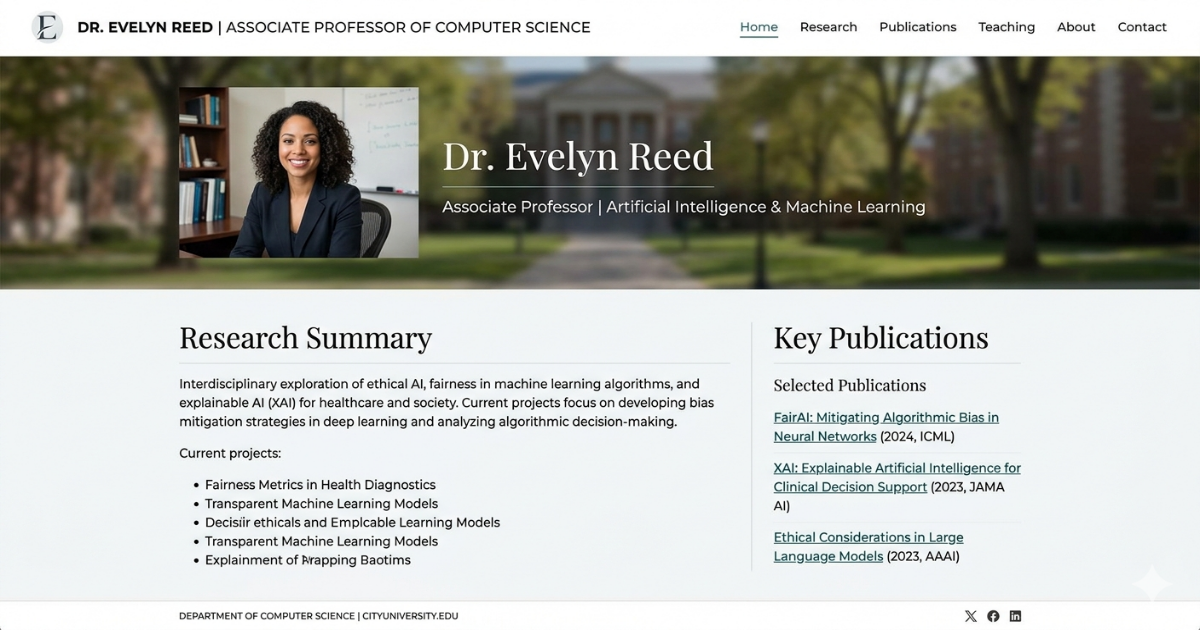
What makes a professor website genuinely effective goes well beyond updating a publication list once a year. The best academic websites are purposeful platforms: they communicate research clearly, signal academic credibility efficiently, and lower the friction for every type of visitor peer, funder, student, journalist, or public to find exactly what they need.
Why Most Academic Websites Underperform
The overwhelming majority of professor websites were built once, quickly, and have been neglected ever since. They follow a default template: a brief institutional biography, a reverse-chronological publications list, a contact form, and perhaps a photo. This structure serves no visitor particularly well.
A peer reviewer looking for your most relevant papers has to scroll through everything you have ever written. A prospective doctoral student cannot tell from your homepage what your lab actually works on day-to-day, or what mentorship philosophy you hold. A journalist working on a deadline cannot find a clear explanation of your research in plain language. A department head from another institution assessing you as a potential hire or collaborator cannot easily grasp the coherence of your research agenda.
The cost of this underperformance is not abstract. Labs with well-structured websites receive more unsolicited collaboration enquiries. Researchers with clear, accessible web presences attract stronger graduate applicants. Professors who communicate their work accessibly online build the kind of public intellectual presence that increasingly influences grant success.
Key Insight: Research by the Nielsen Norman Group consistently finds that academic websites lose the majority of non-expert visitors within the first 20 seconds not because the science is too complex, but because the site fails to answer 'why does this research matter?' before asking visitors to engage with technical detail. A single sentence of plain-language context on your homepage can double the time non-expert visitors spend on your site.
Best Practice 1: Lead With Research Mission, Not Biography
The single most consistent feature of high-performing professor websites is that they lead with what the professor studies, not who the professor is. Biography matters but it lands most effectively after a visitor has already understood and been interested in the research itself.
This is a counterintuitive shift for academics trained in a tradition where credentials come first. But from a visitor's perspective, the research mission is the hook. The biography is the supporting evidence. A homepage that opens with 'Professor Jane Smith is an Associate Professor in the Department of Molecular Biology at...' immediately asks visitors to care about institutional context before they have been given a reason to.
Compare that with a homepage that opens with a single clear sentence: 'We study how tumour cells evade immune detection and how to reverse it.' That sentence works for a peer, a journalist, a funder, and a prospective student simultaneously. It creates immediate engagement and gives every subsequent piece of content on the page a clear anchor.
The practical implication is simple: rewrite your homepage headline. Replace the institutional description with a research mission statement. Keep it to one or two sentences. Aim for maximum clarity and minimum jargon. Everything else on your site can then elaborate.
Best Practice 2: Organise Publications by Research Theme
A reverse-chronological publications list is the default because it requires no thought. It is also the least useful format for almost every type of visitor. The professor who organises publications by research theme or question instead rather than simply by date dramatically improves the usefulness of their publications page.
Consider what happens when a potential collaborator with a specific interest in your computational methods arrives on your publications page. If they are confronted with 200 papers in reverse chronological order, they must either scroll indefinitely or give up. If instead your publications are organised under clear thematic headings 'Cancer Metabolism,' 'Computational Modelling,' 'Clinical Trials' they can navigate directly to what is relevant in seconds.
Theme-based organisation also signals intellectual coherence. It shows that your body of work has structure and direction, rather than appearing as an undifferentiated accumulation. This matters enormously for senior appointments, grant reviews, and institutional evaluations.
For professors with large bodies of work, a hybrid approach works well: a thematic overview with key papers highlighted under each theme, plus a full chronological list for completeness. This serves both the visitor who wants navigation and the one who wants comprehensiveness.
Best Practice 3: Write Research Summaries in Plain Language
Every research area on your website should have two layers: a lay-accessible summary and links to the technical publications. This dual-layer approach serves far more visitors than choosing one register and excluding the other.
The lay summary has one job: to give a first-time visitor enough context to understand why your research matters and to decide whether to explore further. It does not need to be comprehensive. It should not use unexplained jargon. It should answer, in two to four sentences, what question you are trying to answer, why that question matters, and what approach you are taking.
The technical depth then lives in the linked publications, methodology descriptions, and research area sub-pages. Visitors who want that depth can find it. Visitors who do not journalists, potential donors, prospective collaborators from adjacent fields, policymakers get a clear and compelling impression without being excluded.
Wondering how your current website measures up?
Many academics are surprised by how much a structured website review can identify.
See how we review and improve academic websites
Best Practice 4: Build a Team Page That Communicates Culture
The team page is one of the most underused assets on a professor website. Most team pages are a grid of headshots with names, titles, and perhaps a brief research statement. The best team pages do something more: they communicate the intellectual culture and mentorship character of the lab.
This matters most for prospective graduate students and postdoctoral fellows, who are making multi-year decisions about where to work and with whom. A team page that includes genuine descriptions of each member's research interests — not just their formal titles — signals an engaged, communicative environment. It also provides social proof: showing a thriving, multi-level team tells the story of a healthy lab more effectively than any CV.
Leading labs also include brief notes about alumni and where they have gone — positions in industry, academia, or policy. This demonstrates career outcomes and mentorship track record in a way that no amount of prose self-description can match.

Best Practice 5: Maintain a Clear and Current 'Join the Lab' Section
If your lab has openings, your website should reflect this clearly and permanently not as a buried notice under 'Miscellaneous.' A well-structured 'Join the Lab' or 'Opportunities' section reduces friction for applicants at every career stage and signals that the lab is actively building its team.
The most effective versions of this section address different career stages separately: PhD students, postdoctoral fellows, visiting researchers, and undergraduate students each have different questions and different needs. A prospective postdoc wants to know about funding, independence, and publication culture. A prospective PhD student wants to know about supervision style, funding, and career outcomes. Addressing these directly, rather than providing a single generic 'enquiries welcome' statement, dramatically reduces the back-and-forth email volume for both applicant and PI.
Key Insight: Labs with dedicated, multi-stage 'Join the Lab' pages receive a measurably higher proportion of well-targeted applications candidates who have clearly read the lab's research and align their inquiry accordingly compared with labs whose only signal is a generic contact page. Reducing application friction also reduces the PI's administrative burden.
Best Practice 6: Surface Media, Press, and Public Engagement
A section dedicated to press coverage, public lectures, policy contributions, and media appearances signals something important: that you engage with the world beyond peer-reviewed publication. This is increasingly valued by funders, institutions, and collaborators alike.
It also serves a practical purpose. Journalists working to a deadline will look at your website before they email you. If they can see that you have spoken to major publications before, they are more likely to view you as a reliable media source. If your website gives no indication that you engage with public communication, they may move on to someone whose profile is clearer.
Keep this section updated. A press section that shows coverage from five years ago and nothing since is worse than no press section at all — it signals that your public engagement has stopped.
Best Practice 7: Optimise for Search Without Gaming It
Academic SEO is not about keyword stuffing or gaming search algorithms. It is about ensuring that the language you use on your website matches the language people use when searching for your research. If your specialism is 'computational fluid dynamics in turbomachinery,' your website should use those exact terms prominently and consistently not just the internal shorthand that your immediate research community uses.
Page titles, headings, and research summaries should all use the language your intended audience searches for. This includes the specific disease names, technology terms, methodological approaches, and disciplinary keywords that characterise your work. It also includes your name, your institution, and the names of prominent collaborators all signals that help search engines and human visitors locate you accurately.
Consistent metadata title tags, descriptions, and structured data requires a small amount of technical attention but pays dividends in discoverability. If your website is on a platform like Webflow or WordPress, this is straightforward to implement.
Best Practice 8: Keep It Updated on a Consistent Schedule
The most damaging thing a professor website can do is show a publications list that stopped three years ago. It signals unfairly or not that the lab has gone quiet, that the research has stalled, or that the PI is no longer active. This impression takes hold in seconds and is difficult to reverse.
A realistic update schedule looks like this: publications added within a week of acceptance; research area summaries reviewed annually or when a major project concludes; team pages updated within a month of any member joining or departing; news and media sections updated as events occur. This level of maintenance requires perhaps two to four hours per year of deliberate attention a reasonable investment for an asset that works around the clock on your behalf.
Ready to build an academic website
A website that actively generates collaborations, attracts strong applicants, and supports your grant narrative?
Book a free website review for your research lab.
Frequently Asked Questions
Do I really need a personal website if I have an institutional profile page?
Yes. Institutional profile pages are constrained by university templates and IT policies. They typically cannot be updated quickly, cannot be structured around your specific research narrative, and cannot be optimised for search. A personal website gives you full control over how your research is presented and found. Most top-tier professors maintain both.
How long should research summaries be on my homepage?
Two to four sentences for the homepage, with links to fuller descriptions for each research area. The homepage summary has one job: to give a first-time visitor enough context to decide whether to explore further. It needs to be clear and compelling, not comprehensive.
What platform is best for an academic website?
Webflow and Squarespace are both viable for researcher websites that require professional presentation without heavy developer involvement. WordPress remains an option but requires more ongoing maintenance. For labs at major research universities, check whether your institution offers supported web hosting before investing in an external platform.
How do I balance writing for peers and for non-experts?
Build a two-tier architecture: plain-language summaries on homepage and research overview sections, with links to technical publications and methodology details for specialist visitors. Most visitors are not your direct peers — making your site accessible to a broader audience does not compromise your credibility with specialists.
How often should I update my academic website?
Publications: within one week of acceptance. Team pages: within one month of changes. Research summaries: annually or after major project milestones. News and media: as events occur. The biggest risk is allowing a website to go obviously stale — this sends a negative signal to every visitor category.
.gif)


