

Initial Summary
Most academic websites are built by researchers who are expert communicators in their fields but have no formal training in how search engines evaluate and rank web pages. The result is a predictable pattern: websites that are intellectually credible but technically invisible, sites whose content would be genuinely useful to the people searching for it but which never appear in the search results those people are actually reading. On-page SEO the set of practices that determine how search engines read, understand, and rank individual pages on your site is not a dark art. It is a systematic set of signals you send to search engines about what your page is about, who it is for, and why it deserves to rank for specific queries. For academic websites, where the competition for visibility includes both institutional pages and well-optimised academic publishing platforms, getting on-page fundamentals right is the baseline condition for any search-driven discovery. This checklist covers every on-page element that matters for university pages, professor profiles, research lab sites, and departmental pages, organised by priority and with specific implementation guidance for each.
Why On-Page SEO Matters Differently for Academic Websites
Academic websites face a specific search visibility challenge that differs from commercial websites in two important ways.
First, academic content frequently competes for search visibility against the same researcher's presence on Google Scholar, ResearchGate, ORCID, and institutional repository pages. A professor's personal website needs to be well-optimised enough to appear alongside or above these platforms for searches that include the researcher's name and research focus — otherwise, the personal site is effectively invisible in the search results that matter most.
Second, academic website owners often have highly technical content that is difficult for search engines to parse dense jargon, non-standard terminology, PDFs that are not properly indexed, and page structures that bury the most relevant content in the middle of dense paragraphs. On-page optimization for academic sites is therefore partly about technical implementation and partly about translating complex content into a form that is both readable and discoverable.
The Checklist: Organised by Page Type
This checklist is divided into universal elements (applicable to every page on an academic website) and page-specific elements for the most important academic page types.
Part 1: Universal On-Page Elements
Title Tags
The title tag is the single most important on-page element for search ranking. It appears as the clickable headline in search results and tells both users and search engines what the page is about.
Checklist:
- Every page has a unique title tag (no two pages share the same title)
- Title tags are between 50 and 60 characters (longer titles are truncated in search results)
- The primary keyword phrase appears in the title tag, ideally near the beginning
- Title tags describe the specific content of the page, not the site or researcher as a whole
- The researcher's name or institution name appears in title tags for pages where name search is likely (bio, about, homepage)
Academic-specific guidance: For professor websites, the homepage title tag should include name + title + research focus area, not just a name. "Dr. Sarah Chen (Computational Linguistics), NUS" outperforms "Dr. Sarah Chen" because it captures searches for researchers in computational linguistics at NUS, not just name searches.
Meta Descriptions
Meta descriptions don't directly influence rankings but significantly influence click-through rates by telling searchers what they will find if they click your result.
Checklist:
- Every page has a unique meta description
- Meta descriptions are between 140 and 160 characters
- The meta description explains what the page contains and why a searcher would find it useful
- At least one relevant keyword phrase appears naturally in the description
- Meta descriptions are not auto-generated from the first paragraph of page content (which is the default behaviour on most CMS platforms if a description is not explicitly set)
Heading Structure (H1, H2, H3)
Search engines use heading tags to understand the hierarchy and key topics of page content. Correct heading structure is both a ranking signal and an accessibility requirement.
Checklist:
- Every page has exactly one H1 tag containing the primary topic of the page
- The H1 tag matches or closely reflects the page's title tag
- Subheadings use H2 tags for main sections and H3 tags for subsections within those sections
- Heading tags are not used purely for visual styling (large text, bold text) without reflecting actual content hierarchy
- All headings include natural language rather than keyword-stuffed phrases
Common academic website error: Using the researcher's name as the H1 on every page of the site. The H1 should reflect the content of that specific page, not the site owner's identity.

URL Structure
Checklist:
- URLs are descriptive and use hyphens to separate words (not underscores)
- URLs are lowercase
- URLs reflect the content hierarchy of the site (e.g., /research/computational-biology/ not /page?id=47)
- No automatically generated ID-based URLs for important content pages
- URLs do not include unnecessary date parameters for static pages (e.g., avoid /2021/09/publications/)
Image Optimisation
Checklist:
- All images have descriptive alt text that accurately describes the image content
- Alt text for profile photos includes the researcher's name (e.g., "Dr. James Lim, Associate Professor, NUS Computer Science")
- Images are compressed to web-appropriate file sizes (WebP format preferred; JPEG for photographs, PNG for graphics with transparency)
- Images are not the primary carrier of text-based information (charts, diagrams, and infographics should have associated text descriptions)
- Profile photos and key content images are not stored as PDFs
Internal Linking
Checklist:
- Key pages (Research, Publications, About) are linked from the homepage
- Research project pages link back to the main Research page
- Publications link to author profiles and research area pages where relevant
- Anchor text for internal links is descriptive (not "click here" or "read more")
- No orphaned pages — every page on the site is reachable via at least one internal link from another page
Key Insight: For academic websites, the biggest on-page SEO opportunity is almost always the research description page. Most research pages are written entirely in disciplinary jargon that accurately describes the work to specialists but returns zero search traffic because non-specialists journalists, prospective students, industry partners, grant committees from adjacent fields search in plain language. Rewriting the opening section of research pages in plain English, with keyword phrases that reflect how non-specialists actually search for that research area, is typically the single highest-impact on-page change an academic website can make.
Part 2: Page-Specific Checklists
Homepage Checklist
- H1 contains researcher's name and primary research identifier (e.g., "Professor Wei Zhang — AI Ethics Research")
- A plain-language research focus statement appears within the first 150 words of the page body
- Navigation links are text-based (not image-based), allowing search engines to follow them
- A clear page title that includes institution and role
- Social/academic profile links use descriptive anchor text rather than icon-only links
Research / About Research Checklist
- Primary research area phrase appears in H1 and at least twice in the body text naturally
- Each research area or project has its own H2 subheading
- A plain-language description exists for each research area — not just technical jargon
- Key terms are contextualised (the first use of any specialised term is briefly explained)
- Where applicable, funding body names are mentioned in text (grant committee searches often include funder names)
- Links to relevant publications exist within research descriptions
Publications Page Checklist
Publications pages are frequently the highest-traffic pages on academic websites and among the least optimised.
- Page H1 clearly states "Publications" with researcher name context
- Publication entries include journal or conference name (search engines index these as relevant context)
- DOI links and/or open-access PDF links are present for each publication
- Publications are in a crawlable, text-based format — not embedded as a PDF or image
- Author names in publication entries are consistent (helps Google associate publications with the researcher)
- A link to Google Scholar profile is present on the publications page
- Publications from significant venues are briefly contextualised if the venue name alone would not signal significance to a non-specialist
Bio/About Page Checklist
- Current institution, title, and research focus appear in the first paragraph
- The researcher's name appears naturally in the first paragraph
- Career history mentions institution names in full (Google indexes institution names heavily)
- A downloadable CV PDF is linked with descriptive anchor text ("Download CV — Dr. James Tan, 2025")
- External profile links (Google Scholar, ORCID, LinkedIn) use full name or descriptive text as anchor
Part 3: Technical On-Page Factors
Schema Markup for Academic Websites
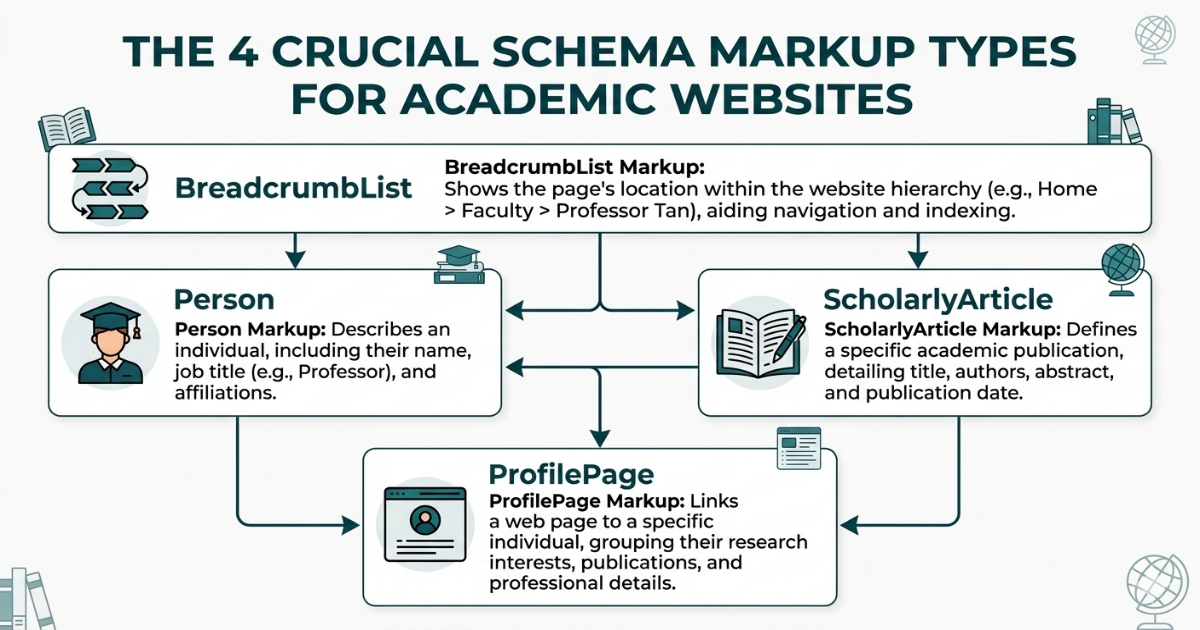
Structured data communicates information about page content to search engines in machine-readable form. For academic websites, the most relevant schema types are:
Person schema — For researcher profile pages and homepages. Communicates name, title, affiliation, research interests, and social profile links.
ScholarlyArticle schema — For pages representing individual publications. Communicates title, author, publication date, and DOI.
ProfilePage schema — For profile and bio pages.
BreadcrumbList schema — For pages within a hierarchical site structure.
Checklist:
- Person schema is implemented on the homepage or primary bio page
- ScholarlyArticle schema is implemented on any individual publication pages
- BreadcrumbList schema is implemented on all pages below the homepage level
- All schema is validated using Google's Rich Results Test
- Schema URLs match canonical page URLs
Canonical Tags
Canonical tags tell search engines which version of a page is the authoritative one, preventing duplicate content issues when the same content is accessible via multiple URLs.
Checklist:
- Every page has a self-referencing canonical tag in the HTML head
- If publications are listed on both a full publications page and a condensed homepage section, canonical tags correctly designate the publications page as authoritative
- HTTP and HTTPS versions of the site are not both accessible (force HTTPS redirect)
- www and non-www versions of the domain redirect to a single canonical version
Strengthen Your Academic Website’s SEO Without Creating New Technical Problems
Improving on-page SEO across an academic website requires careful implementation. Small mistakes in metadata, headings, internal links, or schema can create technical issues that are harder to fix later. A systematic SEO approach ensures your research pages are structured for both search engines and human readers.
→ We help professors and research labs implement academic SEO correctly from the start.
Key Insight: Schema markup implementation on academic websites is significantly underutilised relative to its potential impact. Person schema on a professor's homepage, properly implemented with research interests, affiliation, and social profile links, contributes to Google's Knowledge Graph representation of the researcher meaning Google can begin associating the researcher's name with their field in its entity database. For researchers who want to appear in Google's suggested expert results for their research area, this implementation is one of the most direct signals available. Yet fewer than 10% of academic personal websites implement any structured data whatsoever, according to analyses of academic website technical SEO practices.
Part 4: Content Quality Signals
Search engines evaluate content quality beyond keyword presence. For academic websites, the following content quality factors are particularly relevant.
Content Depth and Completeness
Checklist:
- Research pages contain substantive descriptions (200+ words per research area) rather than one-line summaries
- Publication entries include enough information for a visitor to assess relevance without clicking through
- The About page provides genuine professional context, not just a name and position title
- No significant pages are effectively empty (a page with a heading and one paragraph signals a low-quality site)
Content Freshness
Checklist:
- Publications page has been updated within the past six months
- Homepage bio reflects current position and research focus
- Any project pages reference active or recently completed projects, not decade-old work
- News or updates section (if present) has content from within the past year
Expertise, Authority, and Trust (E-E-A-T) Signals
Google's quality rater guidelines place significant weight on E-E-A-T signals — evidence of genuine expertise and authoritative credentials.
Checklist:
- Academic credentials (PhD, professorial title) appear on the homepage and bio page
- Institutional affiliation is clearly stated and links to the institutional page
- Publication record is visible and verifiable (links to DOIs, Google Scholar)
- Any external media citations or expert commentary mentions are referenced on the site
- The site loads over HTTPS (a basic trust signal)

Is Your Academic Website Actually Visible to the People Searching for Your Research?
Many academic websites exist online, but very few are properly optimised to generate discovery from prospective students, collaborators, journalists, and grant committees who are searching for exactly what you do. A focused SEO consultation helps identify the structural, technical, and content changes that can make your research genuinely discoverable not just technically present.
→ Book a free academic SEO consultation
Frequently Asked Questions
How long does academic SEO take to show results?
On-page optimization changes typically begin to show effects in search rankings within four to eight weeks, as Google recrawls and reindexes updated pages. More substantial effects — meaningful improvement in position for competitive search terms — typically take three to six months of consistent optimisation and content improvement. For researcher name searches (the most common entry point for academic websites), improvements are often faster because the competition for name-specific queries is lower than for broad topic searches.
Should academic websites target keywords at all, or is this too commercial?
Keyword targeting is simply the practice of ensuring your content matches the language your intended audience uses when searching. For an academic website, the "keywords" are the terms prospective students, journalists, and collaborators actually type when searching for research expertise in your area. "Machine learning in healthcare" is not a commercial keyword — it is the phrase a journalist or policy researcher types when looking for expert commentary. Writing research descriptions that match this language is not compromising academic integrity; it is making your work discoverable to people who need it.
Does having a Google Scholar profile help with on-site SEO?
Not directly — your Google Scholar profile is a separate domain (scholar.google.com) and its SEO performance is independent of your personal site. However, linking from your personal site to your Google Scholar profile (and ideally, having your Google Scholar profile link back to your personal site) creates an authoritative cross-reference that supports Google's ability to associate your name with your research field in its knowledge graph. The practical effect is that both properties perform better in searches for your name than either would in isolation.
Should publications be listed as HTML text or is an embedded PDF acceptable?
HTML text is significantly preferable for SEO purposes. An embedded PDF of a publications list is either not indexed at all by search engines (if embedded as an image) or indexed less effectively than equivalent HTML text (if indexed as a PDF document). The individual DOI links, author names, journal names, and paper titles in a text-based HTML publications list are all indexable signals that contribute to the page's search performance. A PDF contains the same information but communicates it to search engines far less effectively.
.gif)


